

You may have noticed other Web sites running tags.

* click on the image to enlarge
This is a tags implementation sample from an Article of MasterNewMedia.org
What is a tag? (according to Wikipedia)
A tag is a keyword or term used to classify content by means of a folksonomy. Tags are usually chosen informally and personally by the author/creator of the item - i.e. not usually as part of some formally defined classification scheme. Tags are typically used in dynamic, flexible, automatically generated internet taxonomies for online resources such as computer files, web pages, digital images, and internet bookmarks (both in social bookmarking services, and in the current generation of web browsers - see Flock and Mozilla Firefox 2.0x). For this reason, "tagging" has become associated with the Web 2.0 movement.
Typically, an item will have one or more "tags" associated with it, as part of some classification software or system. The software will provide links to other items that share that keyword tag, or even to specified collections of tags. This allows for multiple "browseable paths" through the items which can quickly and easily be altered by the collection's administrator, with minimal effort and planning.
This facility was been first introduced by Flickr, Del.icio.us and Technorati in the form of "tag clouds".
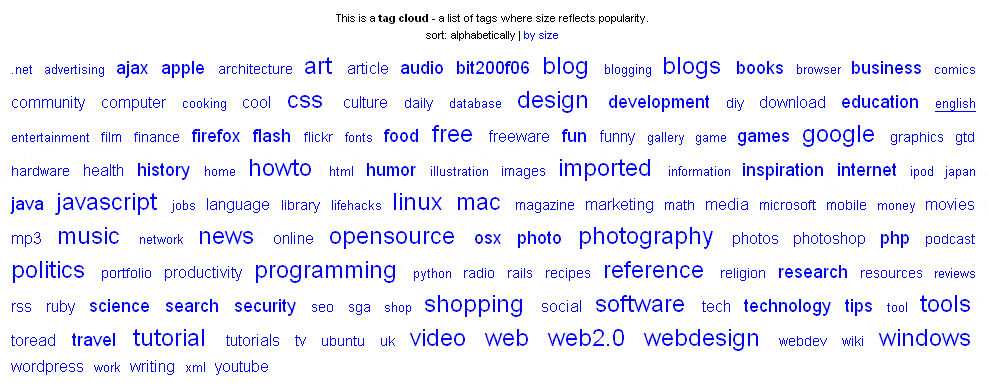
* click on the image to enlarge
This is a tag cloud sample from Del.icio.us (http://del.icio.us/tag/)
The main idea was to display a list of tags in the form of horizontal listing and to associate with each tag a different font size according to the number of posts the tag contained.
PRO IT Service is at your disposal for setting up a simple tag or a tag cloud facility within your Web site.
The benefit to you is that you can complimenting your articles categorization with a more keywords oriented technology - the tags.
For maximum efficiency it's advised that you implement tags in the form of tag clouds.
What is a tag cloud? (according to Wikipedia)
A tag cloud (or weighted list in visual design) can be used as a visual depiction of content tags used on a website. Often, more frequently used tags are depicted in a larger font or otherwise emphasized, while the displayed order is generally alphabetical. Thus both finding a tag by alphabet and by popularity is possible. Selecting a single tag within a tag cloud will generally lead to a collection of items that are associated with that tag.